Guardian Legend, The »
Nintendo
General
At the bottom of the screen you will see your vital info:
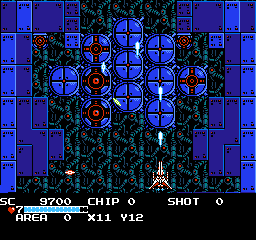
SC: Score. Your total score. As you reach certain scores you will gain an add on to your life bar as well as your speed in the labyrinth. Life increases at:
30,000
100,000
500,000
1,000,000
2,000,000

:Numerical reference to your total life left. You can still be alive at 0 but the next hit will kill you. It's the same as the blue bar. Can also be increased by finding/buying blue lander icons in the labyrinth
Chip: This is tied to your special weapons and your regular gun. Higher chip counts make your gun stronger, and allow you to use more special weapons. As you use special weapons however, your gun will get weaker. Can be recovered by collecting red and blue chips on the map or as enemy drops.
SHOT: The # of times you can use the selected special weapon(it will show up next to the shot #) It increases as you gain more chips. every weapon uses different amounts of chips.
AREA and the X Y coordinates.: Area tells you what different area you are in(they all look different) and the X Y refer to the exact square you are in in the labyrinth. Used for navigation, but just look at the map it's easier.
Pressing Select:
Pressing select at any time brings up the map/status/special weapons screen:

The very top tells you the same as the bottom of the normal screen.
MAP: The blue square on the left half of the screen. More is added as you gain access to more areas. The red outlined square is where you are. The white outlined square with a red middle is where the corridors are. Work your way towards them.
KEYS: After defeating some bosses you gain keys to access new areas. This lists the ones you can pass through.
CHIP MAX: The max number of chips you can hold. Look for Red Landers to increase the amount(red ball thing with eyes)
WEAPON POWER: Tells how strong your main weapon is. Increases by finding little gun icons

in the labyrinth
SHIELD POWER: Each one decreases the amount of damage you can take. Increase by finding little Shield icons

in the labyrinth
WEAPON POWER: This refers to the special weapons(shown on the bottom). This number goes from 1-3. You can find these weapons in the labyrinth, buy them from Blue Landers, or get them for beating bosses and mini bosses.
CHIP COST: The amount of chips you need to fire the selected special weapon. Increases as the power level of the special weapons increases.
SPECIAL WEAPONS: These are the secondary weapons you can find throughout the game. They have 3 levels and will change color in the menu for each different level9blue, green, red). If you have one, and receive/find/ buy it again it will get stronger.
WALKING SECTIONS
Here are some things to look for in the labyrinth sections

Item boxes: Can be found in locations on the map or dropped by enemies. Shoot them open to find:
]

Blue Chip:Gives you a little bit of health and 20 chips

Red Chips:Restores more health than blue chips and gives you 200 chips

Heart: Restores a large amount of health

Energy Tank: Completely restores health

Blue Lander: Increases your total health

Red Lander: Increases total number of chips

Rapid Fire: Increase rate of fire for your normal weapon.
Mini Bosses:
Exploring the labyrinth you will occasionally here 3 warning sounds and then the exits will start to close off. Stay inside and you will fight a mini boss. Beating them gains you an upgrade. If you are unsure that you want to fight this miniboss, stand so the green pyramids form beneath you. You'll stand on top and if you decide not to fight you will not be trapped.
Message Rooms:
Entering some portal leads to message rooms. After the first flying sequence you start in one. Pay attention to what they tell you. This is the only way to know how to open some of the corridors that require you to do certain things.
Blue Lander Rooms:
When you enter a portal and see this guy

he can do one of 2 things for you. If it's a store, he will sell you items in exchange for power chips. Once you choose something from that location, he will no longer sell you anything.
If the room he is in is red, he will offer to save your game and give you a password. Make sure you check the password before you quit because it is long and can be confusing.
Corridors:
The portals that lead to corridors are usually surrounded by blocks of different colors. Upon entering you will see the corridor number displayed and the gate in the middle. If it doesn't open right away you have to do something to make it open.
Tips:
Explore everywhere you can. If you don't you will probably miss a very important special weapon, shield, or gun upgrade and make the upcoming boss fight harder than it needs to be.
If you can temporarily bypass corridors(you have to beat them all the advance though) go ahead to look for more powerups. It will make it easier if you are struggling.
FLYING AREAS:
When you start the game you start out in a flying section. You also go into this mode every time you go through the gate in a corridor.
The speed at which you move through the stage depends on the level, you have no control over that aspect. Kill all the enemies you can and look for power ups they may drop.
At the end of every flying section will be a boss. Some do repeat, but they will move faster, hit harder, shoot more projectiles, and be different colors. Defeating certain bosses gives you keys which grant you access to different areas of the world. You'll see new paths open up on the map screen. Also, when you return to the corridor and walking sections you will gain a power up as well.
Tips:
If you are running low on health, shoot the projectiles the enemies or bosses shoot at you. They may drop an item box containing something that will help you survive.
Most bosses have a weakness to a special weapon. figure it out and it will greatly improve your odds of defeating the boss. Even if you can't find a weakness, some special weapons will destroy their projectiles.
Try not to get hit by the boss itself. The projectiles will hurt you, but the boss hitting you will cause massive damage.
The candle looking special weapon(far right of the second row of special weapons)

can only be used in flying sections.
How to open some corridors that will not just open on their own(the info can be found by exploring but in case you missed it or can't figure out what the message means:










 Linear Mode


