| Help Non-Retro Uprising Questions. Programming help, tech support, self help, advice, the meaning of life - it goes here. |
|
 01-06-2011, 11:24 PM
|
#26
|
|
|
Re: Removing disc scratches at home?
really, that far down? Yeah I got plenty of space left then. Also the games done that for 2 games now, same thing. I'm trying a third game. Glad to know I'm finally getting through franchise mode for now.
|
|

|
|
01-06-2011, 11:25 PM
|
#27
|
|
|
Re: Removing disc scratches at home?
You may not be able to wear it down to the info but you could possibly smear a bunch of little scratches onto it by over doing it, right?
|
My Signature |
|
|
01-06-2011, 11:26 PM
|
#28
|
|
|
Re: Removing disc scratches at home?
I remember you and seahawk mentioning that when I was having issues with a dreamcast game I burned but A; That was a Cd, this is a dvd. B; I believe official discs last longer than burned ones, correct?
---------- Post added at 10:26 PM ---------- Previous post was at 10:25 PM ----------
Quote:
|
You may not be able to wear it down to the info but you could possibly smear a bunch of little scratches onto it by over doing it, right?
|
The only additional residue that appeared was from the eraser and I managed to clear that all up. |
|
|
|
01-06-2011, 11:50 PM
|
#29
|
|
|
Re: Removing disc scratches at home?
What I'm talking about is very fine scratches that would be hard to see. I could be totally wrong but I assume any consistent rubbing with abrasion could lead to ruining it eventually.
|
| My Signature |
|
|
01-06-2011, 11:53 PM
|
#30
|
|
|
Re: Removing disc scratches at home?
perhaps but its running fine other than the freeze at the end of a game and I just played through a third straight game where it resumed after 20-30 seconds. I wonder if it was doing this all along because the toothpaste never did much.
|
|
|
|
01-15-2011, 12:40 PM
|
#31
|
|
|
Re: Removing disc scratches at home?
One thing that I have had luck with is car wax or turtle wax. If the disk isn't too scratched up, you can probably fix it with the wax.
|
|
|
|
01-26-2011, 09:22 AM
|
#33
|
|
|
Re: Removing disc scratches at home?
Sorry for being late. I actually take a cloth and go around the disc with it in a circular motion. I then let it dry into a powder, then wipe the powder off in a straight line from inside to outside of the disc. Another thing you can try is furniture polish. I hear that works pretty good too.
|
|
|
|
01-26-2011, 09:47 AM
|
#34
|
|
|
Re: Removing disc scratches at home?
I have a machine I bought a few years ago called the Skip Doctor (Image below) that I've used to repair everything from scratched music CD's to badly damaged video games. I've always just used a water-based solution with it, but I'm sure it would work with a variety of polishing compounds.
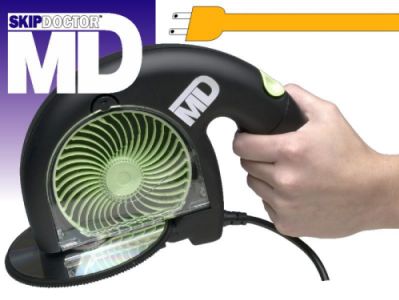 |
| My Signature |
|
|
01-27-2011, 06:24 PM
|
#35
|
|
|
Re: Removing disc scratches at home?
Quote:
Originally Posted by JoeGrotowski

Do you follow the rule of 'straight lines radiating directly from center to edge'?
|
Seems like the most logical idea, though I wouldn't trust myself with wax, too much temptation to do the whole "Wax on wax off." thing for hours. |
|
|
|
02-18-2011, 10:13 AM
|
#36
|
|
|
Re: Removing disc scratches at home?
I have to ask because I haven't seen anyone say anything about it. Are the more prominent scratches Radial (going from middle-to-edge of disc) or Circular (Following the spin of the disc) Circular scratches are what cause the most problems because of the laser's tracking while reading the disc. Since those scratches follow the spin of the disc the laser basically gets derailed because it deflects off the scratch and moved to another point in the data which doesn't coincide with what it just read, so it tries over and over to read that point. It won't be able to hit that section so it won't be able to progress. Radial scratches don't deflect the laser that long because it's more like a speedbump, if you get it small enough the laser will deflect for just a very small fraction of a second and won't lose much (if any) data from reading the disc.
Deep circular scratches are what ruin CDs for the most part. It's very hard to fix them without grinding down. This is also why the CD grinding tools you see have a grindwheel that rubs on the disc from the center to the rim instead of a plate that just sits on the disc and grinds it all at once by spinning them opposite of each other.
(I know it's like a month later but I used to repair discs myself all the time and the topic caught my eye. after reading thought maybe I would share that piece of info so more people can understand what's happening and why certain scratches can ruin a game when another can be scratched to hell and still work fine)
Last edited by TheGuardian; 02-18-2011 at 10:16 AM..
|
| My Signature |
|

|
02-18-2011, 07:03 PM
|
#37
|
|
|
Re: Removing disc scratches at home?
Hi TheGuardian, and welcome to RU, the best site on the net!
{forgive me if I greeted you already, I'm just friendly that way}
I believe you're right about the direction of the scratches on the disk.
Oversampling seems to eliminate most of the smaller problems.
From what I've seen the best results are from the machines; I found a game in a pawnshop whose disk looked dog - chewed {Rover is a smart dog - he can retrieve disks!} and wasn't going to buy it when the guy said:
'No problem, I can fix this.'
Sure enough, he came back a couple of minutes later with what appeared to be a brand new disk.
I even said to him
'You're joking, right? This is a different disk, isn't it?'
But no, it was the very same one.
So for my money, I go get someone like him to get the scratches out.
This particular place charges $2 a disk.
|
| My Signature |
|
Scanty and Kneesocks with Otto Nightmare Team presents:
  Your new nightmare XXVII: Your new nightmare XXVII:

 Posting Rules
|
You may not post new threads
You may not post replies
You may not post attachments
You may not edit your posts
HTML code is Off
|
|
|
All times are GMT -5. The time now is 08:34 AM.
|







 Linear Mode

